

Description
Download Xero – Online Accounting Software for Small Business
Overview
Xero is a cloud-based accounting platform designed specifically for small businesses seeking a modern, accessible, and efficient way to manage their finances. The software enables users to handle invoicing, bank reconciliation, payroll, and financial reporting from any device with an internet connection. By leveraging web and mobile technologies, Xero removes the limitations of traditional desktop accounting tools, offering real-time access to financial data across multiple locations.
Designed for business owners, accountants, and finance managers, Xero supports a wide range of financial workflows, from creating and sending invoices to tracking cash flow and generating detailed reports. Its integration with popular tools like Gmail, Google Sheets, and Google Maps enhances productivity by streamlining communication and data sharing. The platform is particularly beneficial for businesses that operate remotely or require frequent financial oversight from mobile devices.
Developed by Xero, a global leader in online accounting with over 600,000 subscribers worldwide, the software has established itself as a trusted solution for small and growing enterprises. The developer did not provide additional system requirements beyond the supported operating systems. Platform compatibility information is limited to Windows, Mac, Linux, iOS, and Android.
Key Features & Capabilities
- Online Invoicing: Create and send professional invoices instantly, with the ability to enable online payments. Customers can pay directly through the invoice, reducing payment delays.
- Automated Bank Feeds: Sync bank and credit card transactions automatically, reducing manual data entry and minimizing errors during reconciliation.
- Real-Time Financial Reporting: Access customizable dashboards and reports that provide up-to-date insights into cash flow, profitability, and business performance.
- Integrated Payroll: Manage employee payments and ensure compliance with built-in payroll functionality, simplifying HR and finance operations.
- App Ecosystem: Connect with over 480 third-party applications to extend functionality for inventory management, time tracking, and advanced reporting.
- Google Integration: Sign in using a Google account and seamlessly use Gmail, Google Sheets, and Google Maps for enhanced workflow efficiency.
These features collectively help users reduce administrative workload, improve accuracy, and make faster, data-driven decisions. The software is ideal for businesses that prioritize agility, scalability, and digital collaboration. Real-world usage includes remote accountants managing multiple client books, freelancers tracking income and expenses, and small business owners monitoring daily operations from a mobile device.
User Interface, Workflow & Performance
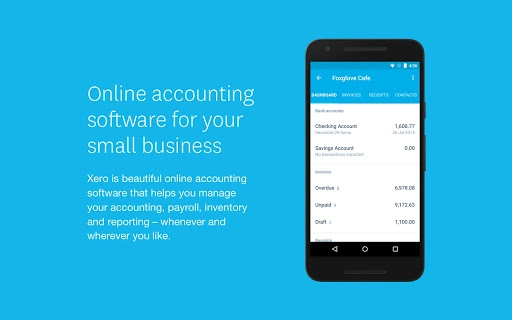
The user interface of Xero is clean, intuitive, and built for web and mobile access. Navigation is structured around core modules such as Accounts, Invoices, Bank, Reports, and Payroll, allowing users to quickly locate essential functions. The dashboard provides a visual summary of key financial metrics, enabling users to monitor performance at a glance.
Workflow efficiency is enhanced by the software’s automation features, such as automatic transaction categorization and recurring invoice scheduling. Users can complete common tasks like sending invoices or reconciling bank statements in just a few clicks. The interface adapts seamlessly across devices, maintaining consistency whether accessed via desktop browser or mobile app.
Performance observations are based on general software behavior patterns. The developer did not specify resource usage details. However, as a cloud-based application, Xero relies on internet connectivity and server-side processing, which means local CPU and RAM usage remain minimal. Stability is expected to be high due to the cloud infrastructure, though performance may vary depending on internet speed and server load.
Compatibility & System Requirements
Xero is compatible with Windows, Mac, Linux, iOS, and Android operating systems, making it accessible across a wide range of devices. The installation size is listed as 2.1 MB, though it’s important to note that this refers to the web application footprint rather than a traditional desktop installer. As a cloud-based platform, no local installation is required beyond a compatible web browser.
Exact system requirements were not listed. Users are advised to ensure their device supports modern web standards, including JavaScript and secure HTTPS connections. The software does not require dedicated hardware, as processing is handled remotely. Compatibility information was partially provided, with no specific mention of minimum processor speed, RAM, or storage needs.
Pros and Cons
Pros
- Cloud-based access from any device with internet connectivity
- Real-time financial data and automated bank feeds
- Seamless integration with Google services and over 480 third-party apps
- Intuitive interface designed for small business users
- Free access with robust core features
Cons
- Requires a stable internet connection for full functionality
- No offline mode available for core operations
- Advanced features may require subscription upgrades
- Dependence on third-party integrations for extended functionality
- Learning curve for users unfamiliar with cloud accounting platforms
FAQ Section
Is Xero available for free?
Yes, Xero offers a free version with core accounting features such as invoicing, bank reconciliation, and basic reporting. Additional advanced features may require a paid subscription.
Can I use Xero offline?
No, Xero is a cloud-based application and requires an active internet connection to function. There is no offline mode for core operations.
How secure is Xero?
Xero employs multiple layers of security to protect user data, including encryption, secure authentication, and regular security audits. The developer did not provide specific details on security protocols beyond general commitments.
Does Xero support mobile devices?
Yes, Xero is accessible on iOS and Android devices through dedicated mobile apps and a responsive web interface.
What operating systems does Xero support?
Xero supports Windows, Mac, Linux, iOS, and Android. Access is provided through a web browser or mobile application.
Final Thoughts + CTA
Xero stands out as a powerful, user-friendly solution for small businesses looking to modernize their accounting processes. Its cloud-first design, automation capabilities, and strong integration ecosystem make it a top choice for entrepreneurs and finance professionals alike. While it relies on internet connectivity and lacks offline functionality, its benefits in accessibility, real-time reporting, and ease of use far outweigh these limitations for most users.
Whether you're managing a growing business, working remotely, or collaborating with an accountant, Xero delivers a seamless financial management experience. The free version offers significant value, making it an ideal starting point for startups and solopreneurs.
Download Xero now to take control of your finances with confidence and efficiency.
Guides & Tutorials for Xero Accounting App for Chrome
How to install Xero Accounting App for Chrome
- Click the Preview / Download button above.
- Once redirected, accept the terms and click Install.
- Wait for the Xero Accounting App for Chrome download to finish on your device.
How to use Xero Accounting App for Chrome
This software is primarily used for its core features described above. Open the app after installation to explore its capabilities.
User Reviews for Xero Accounting App for Chrome 0
No reviews found





